---
title: Rebate
description: Refund part of a paid invoice while keeping the subscription active, for money-back guarantee windows.
---
A rebate returns part of an invoice the customer has already paid, while their subscription stays active. Use it for money-back guarantee windows: when a customer would otherwise cancel and ask for a refund, give back some of what they paid and keep them subscribed.
::alert{type="info"}
Rebates are Stripe only. The refund is issued as a Stripe credit note against the paid invoice and returns to the customer's original payment method, not to account credit.
::
## When to use it
A rebate fits when a customer is leaving over a recent charge rather than the price going forward: a money-back guarantee, or a renewal they meant to cancel in time. A discount lowers future payments; a rebate gives back money you've already collected. Their plan, price, and renewal date stay the same.
## How it works
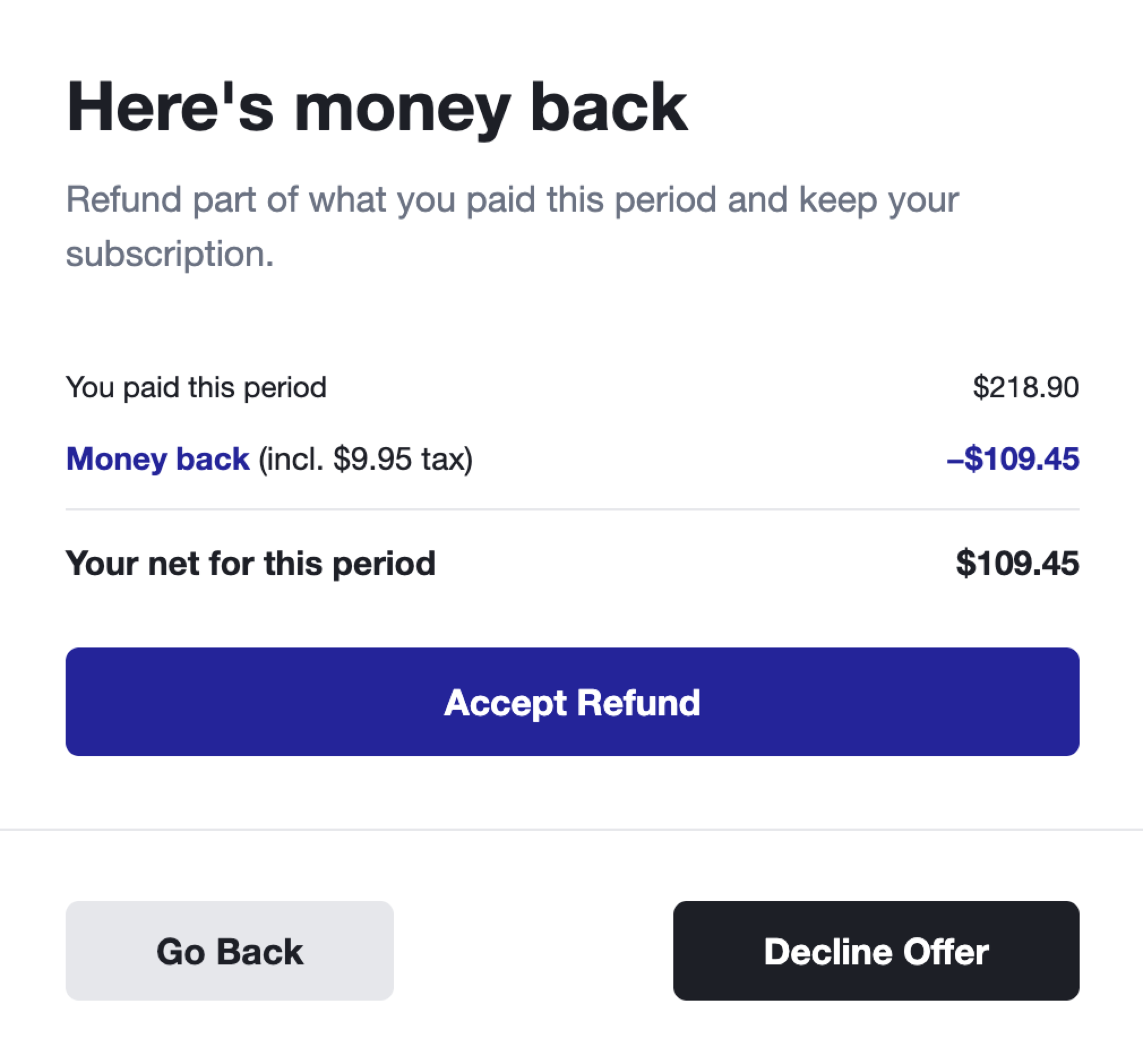
When a customer reaches the rebate step, Churnkey finds a qualifying paid invoice and shows an invoice-style breakdown: what they paid this period, the money coming back, and their net for the period.
If they accept, Churnkey issues a Stripe credit note against that invoice and refunds the amount to the card on file. The subscription continues unchanged. If they decline, the flow proceeds to cancellation.
## Configuration
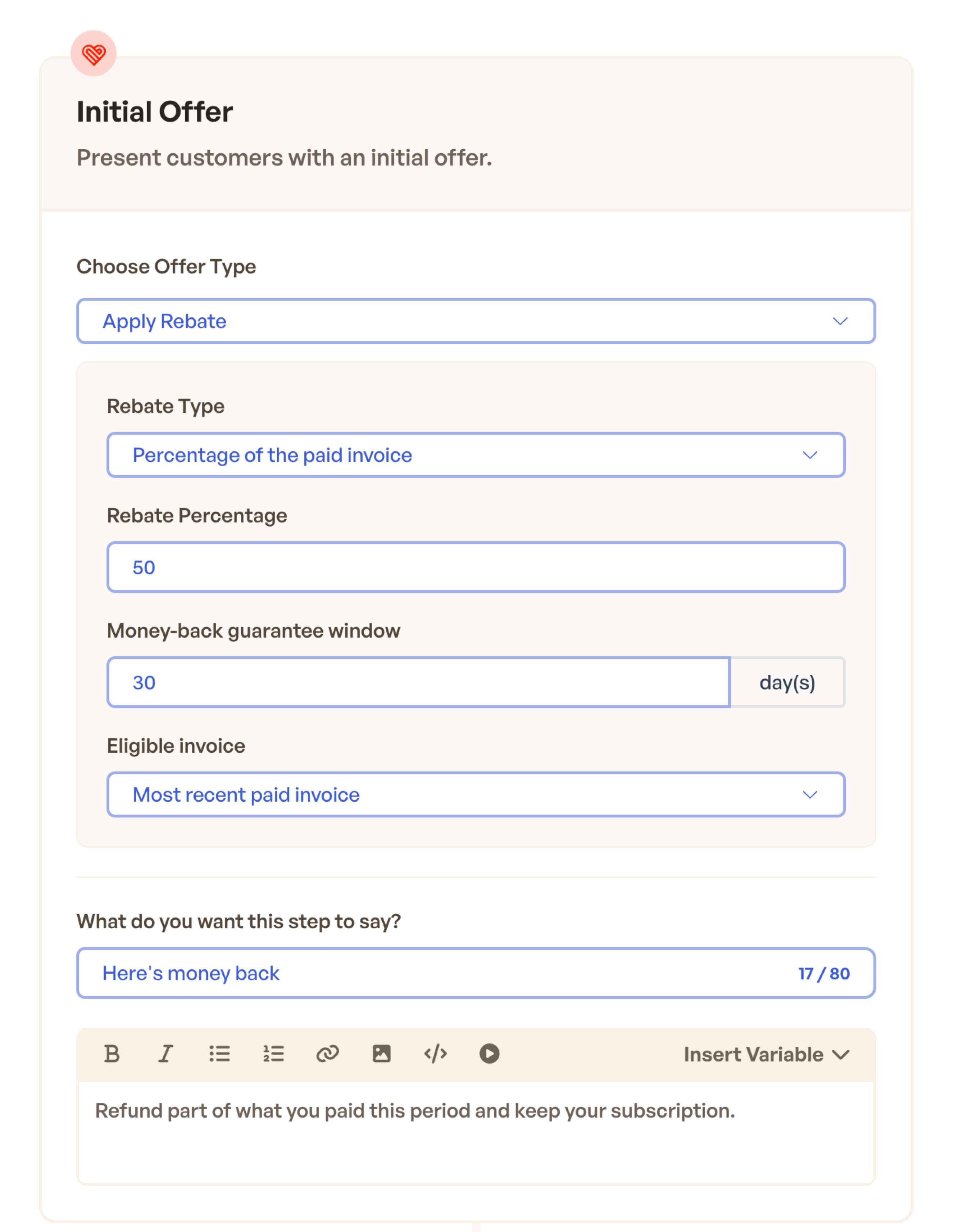
Add an offer step and choose **Apply Rebate** as the offer type, then set:
- **Rebate type.** A fixed amount, or a percentage of the paid invoice.
- **Money-back guarantee window.** How many days after an invoice is paid the rebate stays available. Defaults to 30; older invoices don't qualify.
- **Eligible invoice.** Which invoice to rebate: the most recent paid invoice (default) or the first paid.
## How tax is handled
The amount you configure is the pre-tax figure. Stripe adds the tax for that invoice line, so the customer is refunded the configured amount plus its tax.
- A $40 rebate on a tax-exclusive invoice at 7% refunds **$42.80**.
- On an invoice with no tax, or with tax-inclusive pricing, the refund equals the configured amount (**$40**).
You don't set the tax yourself. Stripe calculates it from the original invoice, so the refund matches what the customer was charged.
## When a rebate is shown
A customer sees the rebate only when all of these hold:
- The subscription is active.
- They have a paid invoice within the money-back guarantee window.
- The invoice has a real charge (comp and $0 invoices don't qualify).
- No rebate has already been issued on that invoice.
Customers who don't qualify never see the step; the flow moves on rather than showing an empty offer.
## What the customer sees
The step renders as a short invoice:
- **You paid this period.** The gross amount on the invoice.
- **Money back.** The refund, with the tax portion noted when there is one.
- **Your net for this period.** What they paid after the refund.
The button reads **Accept Refund**. After accepting, the customer sees a confirmation and keeps their subscription.
## Testing
Use **Preview** in the builder to check copy and layout. In **Test Mode**, run the flow against a Stripe test customer that has a recent paid invoice, and confirm the credit note and refund appear in your Stripe test dashboard. Retries are safe: Churnkey won't issue a second refund for an invoice that already has one.
## Limitations
- **Stripe only** for now.
- A rebate is credited against a single invoice line (the largest on the invoice). If the configured amount exceeds that line, the offer is rejected rather than partially applied; splitting a rebate across multiple line items isn't supported yet.