Rebate
A rebate returns part of an invoice the customer has already paid, while their subscription stays active. Use it for money-back guarantee windows: when a customer would otherwise cancel and ask for a refund, give back some of what they paid and keep them subscribed.
Rebates are Stripe only. The refund is issued as a Stripe credit note against the paid invoice and returns to the customer's original payment method, not to account credit.
When to use it
A rebate fits when a customer is leaving over a recent charge rather than the price going forward: a money-back guarantee, or a renewal they meant to cancel in time. A discount lowers future payments; a rebate gives back money you've already collected. Their plan, price, and renewal date stay the same.
How it works
When a customer reaches the rebate step, Churnkey finds a qualifying paid invoice and shows an invoice-style breakdown: what they paid this period, the money coming back, and their net for the period.
If they accept, Churnkey issues a Stripe credit note against that invoice and refunds the amount to the card on file. The subscription continues unchanged. If they decline, the flow proceeds to cancellation.
Configuration
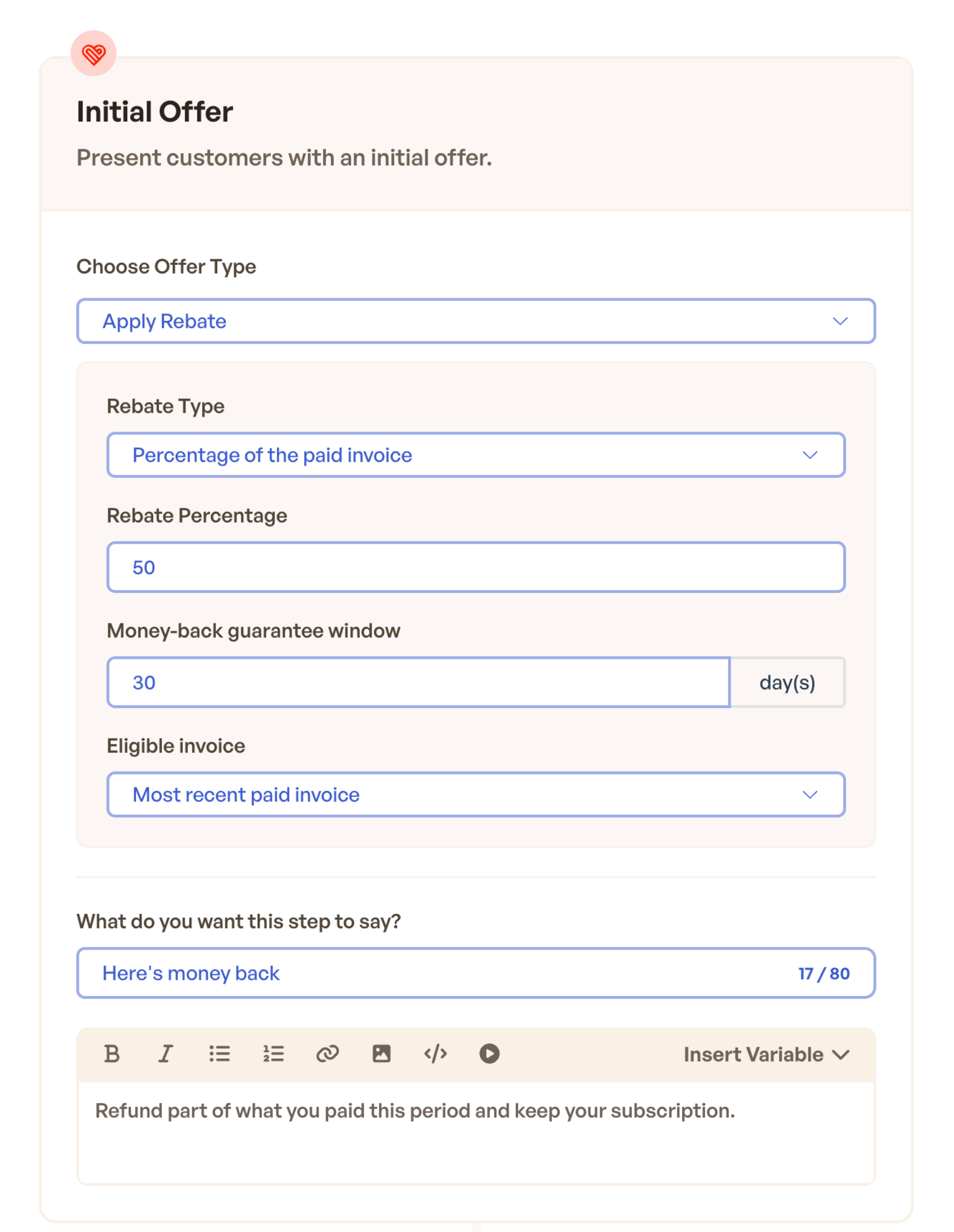
Add an offer step and choose Apply Rebate as the offer type, then set:
- Rebate type. A percentage of the paid invoice, or fixed amounts configured explicitly for each eligible invoice currency.
- Money-back guarantee window. How many days after an invoice is paid the rebate stays available. Defaults to 30; older invoices don't qualify.
- Eligible invoice. Which invoice to rebate: the most recent paid invoice (default) or the first paid.
To limit rebates across the organization, go to Cancel Flows → Settings → Offer Redemption Settings and set Maximum Rebate by Currency. Each row is a per-redemption, pre-tax ceiling: a 20% offer with a $500 USD maximum gives back no more than $500 before tax on a USD invoice. An invoice currency without an entry remains uncapped. Remove every row to leave all currencies uncapped, or set a currency's maximum to zero to disable rebates for that currency.
How tax is handled
The offer amount and any organization maximum are both pre-tax figures. After applying the maximum, Stripe adds the tax for that invoice line, so the customer's total card refund can be higher than the organization's pre-tax ceiling.
- A $40 resolved rebate (after any organization maximum) on a tax-exclusive invoice at 7% refunds $42.80.
- On an invoice with no tax, or with tax-inclusive pricing, the refund equals the resolved rebate ($40).
You don't set the tax yourself. Stripe calculates it from the original invoice, so the refund matches what the customer was charged.
When a rebate is shown
A customer sees the rebate only when all of these hold:
- The subscription is active.
- They have a paid invoice within the money-back guarantee window.
- The invoice has a real charge (comp and $0 invoices don't qualify).
- No rebate has already been issued on that invoice.
- For a fixed rebate, its invoice currency has a configured fixed amount.
- If the invoice currency has an organization maximum, the resolved rebate is greater than zero after applying it.
Customers who don't qualify never see the step; the flow moves on rather than showing an empty offer.
What the customer sees
The step renders as a short invoice:
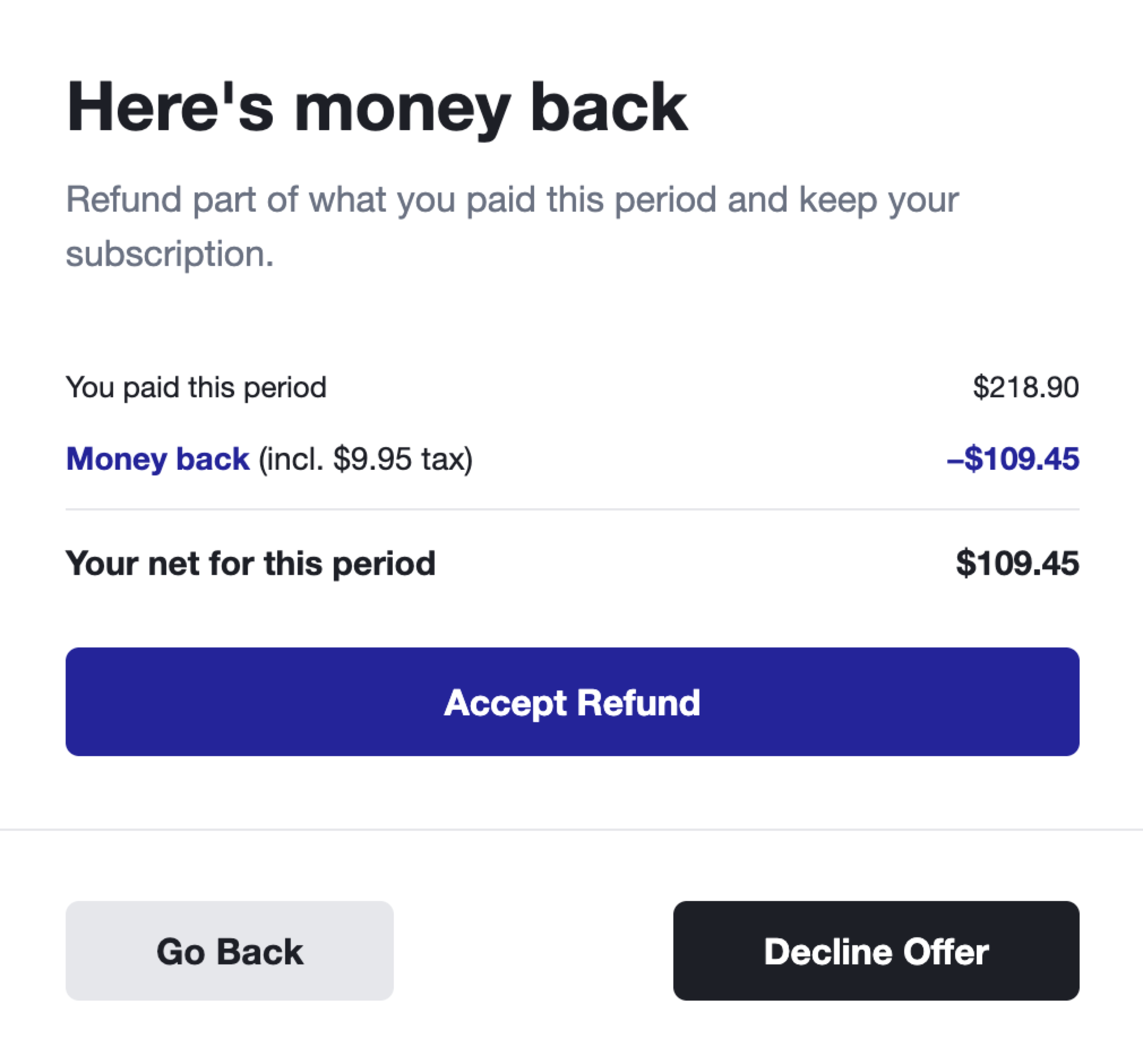
- You paid this period. The gross amount on the invoice.
- Money back. The refund, with the tax portion noted when there is one.
- Your net for this period. What they paid after the refund.
The button reads Accept Refund. After accepting, the customer sees a confirmation and keeps their subscription.
Testing
Use Preview in the builder to check copy and layout. In Test Mode, run the flow against a Stripe test customer that has a recent paid invoice, and confirm the credit note and refund appear in your Stripe test dashboard. Retries are safe: Churnkey won't issue a second refund for an invoice that already has one.
Limitations
- Stripe only for now.
- A rebate is credited against a single invoice line (the largest on the invoice). If the configured amount exceeds that line, the offer is rejected rather than partially applied; splitting a rebate across multiple line items isn't supported yet.